Get Started
eTrk - Solution Overview
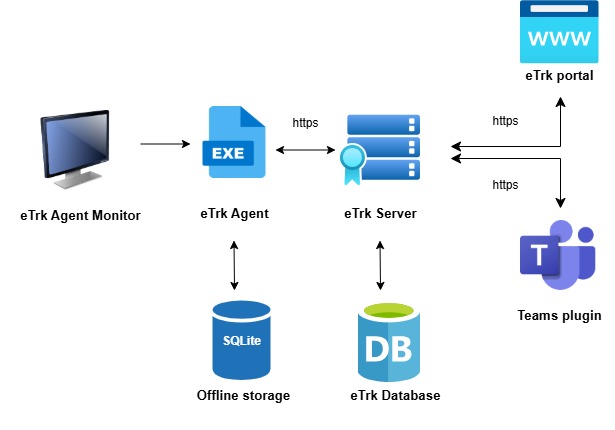
eTrk Agent Monitor
Agent Monitor is used for monitoring the Agent’s running status, and it is restarted if it has stopped for any reason. On Windows, Task Scheduler is used for this purpose, while on Linux, it is handled through Services.
eTrk Agent
eTrk Agents are client-side components installed on employees computers and laptops.
They track user activities, such as login and logout events, monitor employees active and idle time, record application usage, and capture screenshots based on the configuration.
Providing monitoring support on both Windows and Ubuntu Linux operating systems.
eTrk Server
A server component that exposes APIs for interaction with both the eTrk agent and the web portal. All data captured by the eTrk agent is stored in a centralized database through the server’s APIs.
Additionally, the eTrk Web Portal utilizes Server APIs to display data on the dashboard, offering insights into the captured information.
eTrk Web Portal
A web portal designed to manage eTrk and visualize the captured data.
IT Administrators can monitor the agent’s running status, including browser extensions and software installations on employee systems. eTrk Administrators have the ability to manage users, projects, applications mapping , holiday calendars, roles mapping, and more. Both employees and reporting managers can access real-time and historical data on employee activities, offering a detailed overview of user interactions.